An Old Office Laptop Replaced $292/Month of Cloud VMs
In August 2026 a 2020 ASUS office laptop came out of a drawer where it had spent a year doing nothing. Intel i5-10300H, 4 cores / 8 threads, 32 GB of RAM, a 1 TB NVMe. Debian 13 went on from the netinst image on August 30. Two days later one of its VMs was building and deploying a production site in about 100 seconds, a job that took 7 to 12 minutes on a VPS.
TL;DR
- The same capacity costs ~$292/month on DigitalOcean. The laptop costs ~$3 in electricity.
- No Proxmox. Plain Debian + KVM: smaller attack surface, one trust chain.
- Nothing runs on the host. Every workload lives in a VM; untrusted ones in gVisor inside the VM.
- The VMs shut themselves off when idle and free 16 GB of RAM.
Any AI assistant will write you a KVM tutorial in ten seconds. This post is the part it can’t write: the decisions, the numbers, and what bit me.
The math
The laptop runs two VMs: build (8 vCPU, 16 GB) and scraper (4 vCPU, 4 GB, its own Postgres). The closest single droplet on DigitalOcean, August 2026 prices:
- General Purpose 8 vCPU / 32 GB: $272/month
- Block storage: ~$20/month
- If 4 vCPU is enough, Memory-Optimized has the same 32 GB for $168
| Cloud | Laptop | |
|---|---|---|
| Monthly | ~$292 | ~$2-3 of electricity (estimate, ~20 W average) |
| One-off | 0 | 32 GB kit + 1 TB NVMe, street price in Chile ~CLP 400-500K (~US$430-540) |
The upgrade pays for itself in under two months.
- Every company has two or three laptops like this in a closet.
- The provisioning is a 9-phase idempotent bash script over SSH. It would provision yours too.
- Bonus: a laptop is its own UPS. The battery is capped at 60% via
charge_control_end_threshold.
Why not Proxmox
Every tutorial, and every AI answer, starts with “install Proxmox”. So did the plan in July. What went on the machine is plain Debian 13 + KVM/libvirt + ZFS, with Cockpit on the LAN as a console.
Personal reason. The paid enterprise repo never sat right with me. Debian will never send me a bill, and Proxmox’s no-subscription repo is explicitly the less-tested one.
Technical reason. The web UI is pretty, but look at what runs behind it:
pveproxy: a Perl HTTP server on port 8006pvedaemon: running as root- Turning them off isn’t supported. The best you can do is bind them to localhost.
- Libvirt, by contrast, listens on a UNIX socket. Zero TCP.
- QEMU guest-escape CVEs hit both the same. Proxmox adds a management plane on top.
To be fair, Proxmox won on operability in the same evaluation, 9 to 6.5: templates, clones and snapshots are first-class there and scripts here. I’d rather drive VMs from SSH than from a browser anyway.
Nothing runs on the host
The provisioning script had a phase that installed Docker with gVisor on the host. It ran on August 30. The same afternoon I purged it: Docker, runsc, the apt sources, the docker0 bridge.
If you have a hypervisor, running anything outside a VM is madness.
The host is KVM, ZFS, Cockpit and sshd. Nothing else.
Docker lives inside the VMs, and gVisor still applies there without nested virt. The scraper, the untrusted workload, runs as a runsc container inside its VM:
- read-only filesystem
cap_drop: ALL- non-root user
Three layers: gVisor → KVM → host.
gVisor charged me twice:
- DNS. Docker’s embedded resolver is unreachable under gVisor on custom Compose networks. Fix:
network_mode: bridge+ external DNS. - musl. Vite’s native binding cost 50 seconds per build until the image moved from alpine to glibc.
VMs that turn themselves off
Both VMs are on-demand. A host cron runs every 15 minutes and shuts a VM down after two idle strikes. Idle means both signals:
- QEMU process under 5% of one core, and
- under 512 KB of network in the cycle.
Why both: CPU alone would kill a rate-limited scrape mid-run. Zero CPU, megabytes moving. Any anomaly means don’t shut down. An idle VM’s noise is 22-23 KB per cycle; the margin is comfortable.
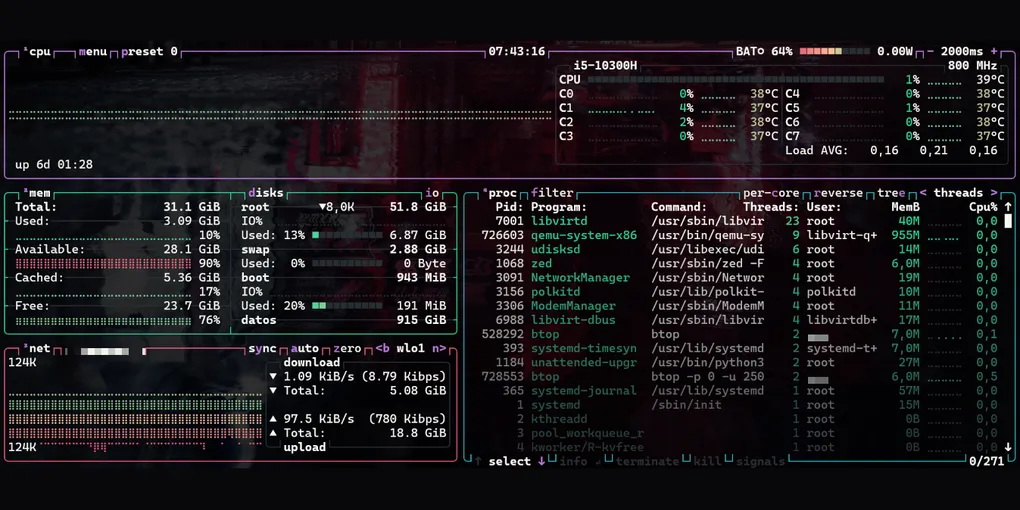
Result: 24 GB used → 8 GB with both off.
There’s no other way to get that RAM back. drop_caches in the guest doesn’t lower the host RSS at all; only balloon or shutdown does. The deploy script starts the build VM itself (+17 s). A VM being off is normal, not a failure.
Push-only
- The build VM pushes with a key that is
restrict+rrsync -wo: write-only into one directory. Tested: no shell, no reads, no escape. - Egress from the VM is an nftables allowlist.
- Nothing ever comes down from production. If prod is compromised, pulling a file from it infects the machine holding every other key.
A public IP for $4 (not built yet)
Behind a residential ISP, the plan for anything public:
- The cheapest droplet ($4).
- A WireGuard tunnel from the laptop out to it.
- A reverse proxy on the droplet into the LAN.
Static IP, TLS on the droplet, home IP never in DNS.
Honest limits: no DigitalOcean region in Chile, so every request hops to the US; uptime is residential power and internet. Fine for builds, scrapers, crons and staging. Not for latency-sensitive production. Not built yet; the two VMs don’t need it.
What bit me
| Gotcha | Fix |
|---|---|
| Debian 13 cloud image is EFI-only; SeaBIOS boot-loops | virt-install --boot uefi |
| Cloud image ships without SSH host keys | virt-customize --run-command "ssh-keygen -A" |
| cloud-init never ran with a NoCloud seed (still unexplained) | virt-customize does its job |
| Secure Boot + ZFS: the DKMS module won’t load unsigned | sign with the DKMS MOK key, enroll once with mokutil |
| The VM and the workstation share a public IP; one failed SSH login from the VM trips fail2ban for both | stop at the first Permission denied |
What the AI gave me, and what it didn’t
Claude Code gave me: the commands, the systemd unit for the battery, the ZFS flags, the nftables syntax, the cron.
What it didn’t: nothing on the host, the double idle signal, the write-only jail, push-only.
Those come from having something to lose. What I look at every day is btop over SSH.